
OMR bluetooth locks
Smartphones are indispensable tools for everyone in everyday life and the tasks they can perform increase every day, making them the most versatile devices ever. We use smartphones to book hotel rooms, buy online, order groceries from our trusted stores, turn on the home heating, talk to the coffee machine and the refrigerator: who knows in the future how many other unthinkable activities we will be able to do only with help of our smartphones!
Why not use the phone to also receive opening codes for a door, locker or any piece of furniture? There are many spaces in which the use of compartments is always carried out by different people and the management of keys creates a lot of expenses and waste of time due to to their breakage, loss and theft. At the sam time, the possibility of creating access control in order to trace users for safety reasons and better management of spaces is becoming increasingly important. All of these needs cannot be met with the traditional mechanical key, but more innovative and advanced tools are needed.
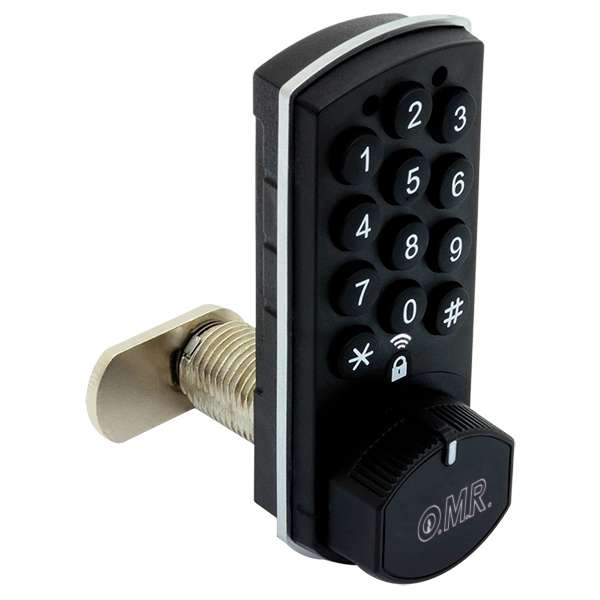
It is for this reason that the Hellock family of electronic locks from today expands to better and better meet the most diverse needs: we welcome the Bluetooth version!
The electronic lock that you can open and close remotely: Hellock bluetooth
The battery-operated lock can be fully managed remotely thanks to the presence of a Bluetooth hub that provides a considerable variety of functions: displaying the open/closed status, sending access codes to users via SMS or email, changing lock settings, and viewing the event log. The user will simply view the code sent by SMS or e-mail on his or her smartphone and type it into the lock in total convenience!
The electronic lock has the same dimensions as its sisters, unique in its compactness and discretion in any environment, being able to be conveniently installed as a replacement for any standard mechanical lock without having to make changes to the hole.
This brief table summarizes all the specific features of each model: choose the one best suited to your needs!
* Only through pairing with App;
** If paired with App, enabled users must be uploaded manually.